
How to.... change fonts
How to change fonts in firmware. Tools for this: MTKRemaker and MtkFontCreator.
Get from "Download" section. Also read this article.
 Open firmware in MTKRemaker. Expand section "Data Part", "OSD",
OSD 1 Visuals", "Fonts".
Open firmware in MTKRemaker. Expand section "Data Part", "OSD",
OSD 1 Visuals", "Fonts".
Philips firmware use 3 types of fonts. OSD+FileBrowser, Graphic and subtitles.
I use a new one, only for filebrowser.
Font 1 is for OSD:
Graphic font look like this:
Subtitle font(s) look like this:
And for file browser:
It's very easy to find "type" of font. OSD and Graphic font
use "transparent" background, subtitle font use "normal"
background and for file browser color are inverted (outline is "white"
and text is "black".
Click with the right button on "Font" corresponding,
choose "Replace", and select the file created by MtkFontCreator.
Now, about MTKFontCreator. When run program, this ask for a "ini"
file. Choose original (MtkFontCreator.ini) or one of my file, with more
option (for OSD and special fonts).

Select Code Page and "type" of font: Subtitle ("Windows
Code Page")

Filebrowser ("Special Code Page")

or OSD (for OSD language)

For Outline choose 2.
For Subtitle font, select Background=Background, Outline=Outline and
Body=Body.
For OSD font, select Background=Background (transparent), Outline=Outline
and Body=Body.
For File Browser, select Background=Background (transparent), Outline=Body
and Body=Outline.

Other option: "Right margin" = 0 and Top/Bottom "Cut" = 1.


Check subtitles font, for 44 characters, text width must be less then 640.
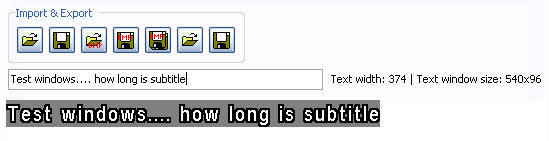
Save font as MTK font and replace in MTKRemaker.
That's all.