
How to.... add a new OSD language
How to add a new OSD language in firmware. Tools for this: MTKRemaker
and MTKLangCreator. Get from "Download" section. Also read this
article.
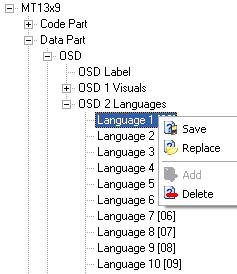
Open firmware in MTKRemaker. Expand "Data Part", "OSD",
"OSD 2 Language". Save Language1[00]. This is English language.
Open this file (mtl) in MtkLangCreator and save as a "Mediatek Language
Creator file" (*.mlc).
Open mlc file in a text editor like Notepad. Take a look to this file
(is from a "Polski" language).
0x0051 = 96K
0x0052 = 96kbps
0x0053 = kodek audio nie jest obs\F[1]\[0x07]\F[0]ugiwany
0x0054 = AAC
0x0055 = \F[2]\[0x1B]\F[0]D
0x0056 = USTAWIENIA D\F[1]\[0x09]\F[0]WI\F[1]\[0x0A]\F[0]KU
Each line is a OSD message or a text from Setup. Translate all or only
text that are important for you.
Now, this texts use OSD font witch in firmware is Font1[00-01]. This font
is a standard CP 1252 font + specials characters for language used in
firmware.
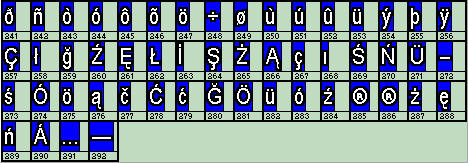
If you want to use special characters in your translated language, check
if are here. If not, you must make a new OSD font.
This can be a standard CP font, but in this case you must remove (or not
use..) language from firmware who use special characters and those are
not in new OSD font. If you want to keep original OSD font, add your special
characters in ini file from MTKFontCreator (where are free position -
at begining or to end).
Description=Philips New - OSD Font (0-1)
Max=291
0x00=0x0000 -->>> replace with unicod of your character
0x01=0x0001
0x02=0x0002
0x03=0x0003
0x04=0x0004
0x05=0x0005
0x06=0x0006
If you don't need special characters or your language is from CP 1252,
you need only to translate text.
Back to translation: A special line is like this:
0x0056 = USTAWIENIA D\F[1]\[0x09]\F[0]WI\F[1]\[0x0A]\F[0]KU
Use F[0] for characters from 1 to 255, F[0] is font 0 - OSD font use two
fonts 0 (1-256 position) and 1 (start from 257). For characters
from font 1 you must substract position - 256. Example, if your
character is in MTKRemaker in position 266, in translation text you must
write F1[1]\[0x0A], 266-256=10 (A in hexa).When return to font0 add F[0]text.
Now you are ready to translate... In MTKRemaker, select what language
want to replace:
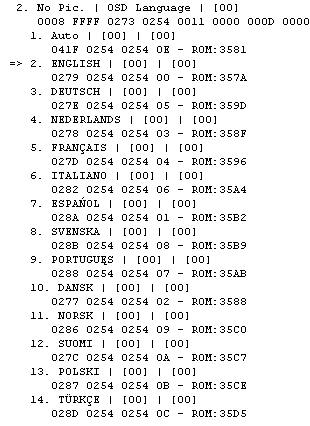
Let's say you want to replace POLSKI language. This is language 0B (language
12). Search in text file (mlc) for string "POLSKI" and replace
with name of your language. This must be maked in all language, but this
is optional.
When finish, save file, open in MTKLangCreator and save as MTK language (mtl).
Now, open firmware in MTKRemaker and replace a language with your new
language. Click on text (in right panel) and see how look.

If all text are OK, save firmware and test.